Jobvera

For service techs and the people who dispatch them

From the customer's first text to a paid invoice, on one phone.

Jobvera turns a customer's description into an estimate, gets it signed before you roll, and tells the office who's where and who still owes. Built by a working RV tech who got tired of paper tickets.

Android app coming to Google Play. No card needed for the trial.

How a job moves

Four steps, and the app does the paperwork in between

Step 1 · Request

Customer sends the problem

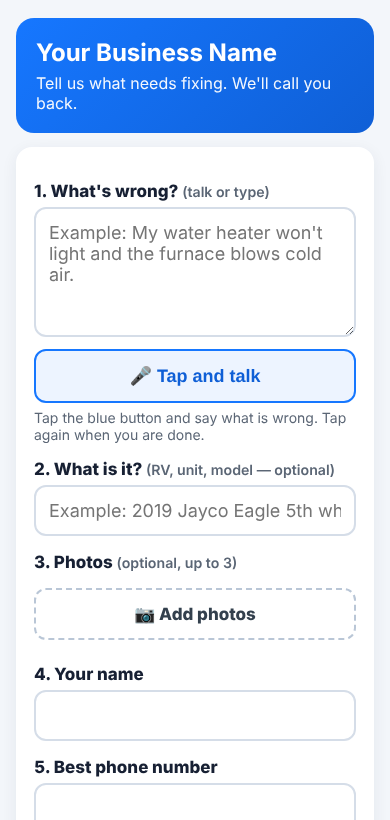
Text them your request link. They talk or type what's wrong and add photos. It lands on your board, and follow-ups attach to the same job.

Step 2 · Estimate

AI drafts the ticket

Jobvera reads their description and builds the line items from your own price list. You check it, fix a rate, done.

Step 3 · Approval

They sign before you go

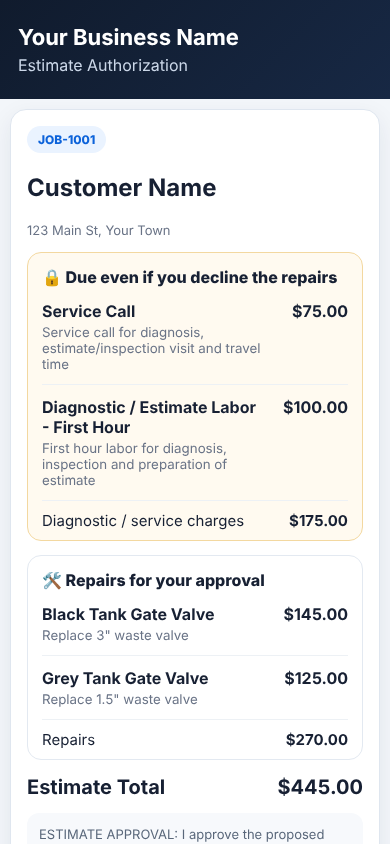
The customer gets a link, sees what's owed either way and what's up for approval, and signs on their phone.

Step 4 · Invoice

Finish, bill, get paid

Turn the job into an invoice, take the completion signature, and track who still owes, including dealerships with PO numbers.

Customer request form with a Tap and talk button and photo upload

Your own request page

Shows your company name, logo and phone. One request per phone number a day, so nobody floods you.

Customer approval page splitting diagnostic charges from repairs

Approvals that hold up

Diagnostic fees are shown as due even if they decline. Decline the repairs and the job becomes a diagnostic invoice by itself.

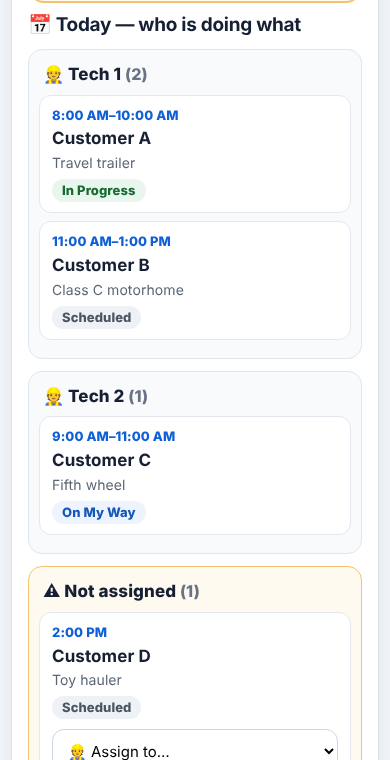
Office Board showing each technician's jobs today and unassigned work

An office board that keeps up

Who's on what today, which approvals are waiting, and who owes money. Assign a job or send a reminder in one tap.

Bill to a companyDealership or warranty company pays, the customer doesn't. Statements by company.
Team logins by roleOwner, manager, office, technician, parts runner. Each sees what they need.
Works offlineKeep writing tickets with no signal. It syncs when you're back.
Talk instead of typeTap the microphone and say it. Handy with greasy hands.
Photos and signaturesBefore and after photos, customer and completion signatures on the ticket.
Your data stays yoursEach company is walled off. Delete your account and everything goes with it.

Set up for your trade

RV repairHVACPlumbingElectricalAppliance repairMobile mechanicMarineHandymanPressure washingSmall engine
"I wanted an app my 80-year-old customers could approve on, and my newest tech could learn in a day."

Jobvera started inside a family-run mobile RV repair business in Florida. Years of HVAC, fire and RV service work meant years of carbon-copy tickets, missed callbacks and chasing approvals by text.

So every screen is built around the truck: big buttons, plain words, and nothing that needs a training video. If it slows down a service call, it doesn't ship.

Pricing

One price per person. Add people when you hire.

Pay for the people who use Jobvera, from a solo tech up to 200. Change the count any time from the app.

Per seat, per month

$9.99 / person

  • Every feature, for every seat
  • 14 days free, up to 5 people, no card
  • Adding a person charges only the rest of this month
  • Billed through Google Play, cancel any time
3

$9.99 × 3 = $29.97 a month

More than 200 people? Email us for a company plan.

Questions

Straight answers

Do my customers need the app?

No. Request links and approval links open in any phone's web browser. Nothing to download.

What happens after the free trial?

The owner picks a number of seats. If you don't, your jobs stay safe and viewable, and syncing pauses until you choose a plan.

Can the office use a computer?

Yes. Sign in on the web with the same account. Purchases are made in the Android app.

Does it take payments?

Jobvera records cash, check, Zelle and bank transfers. It never asks for or stores card or bank numbers.

Who sees my customers?

Only people you add to your company. Your records are never sold or used for ads.

How do I delete my account?

In the app: More → Jobvera Account → Delete my account. Or use the delete account page.

Questions or a demo?

Email us and a real person who runs service calls will answer.

support@getjobvera.com